
The Slicing Window
Slices are requirements derived from use case stories. Create slices of individual use case stories in the slicing window.
Open the dialog:
- via the context menu of a use case with the Slicing… command.
The dialog
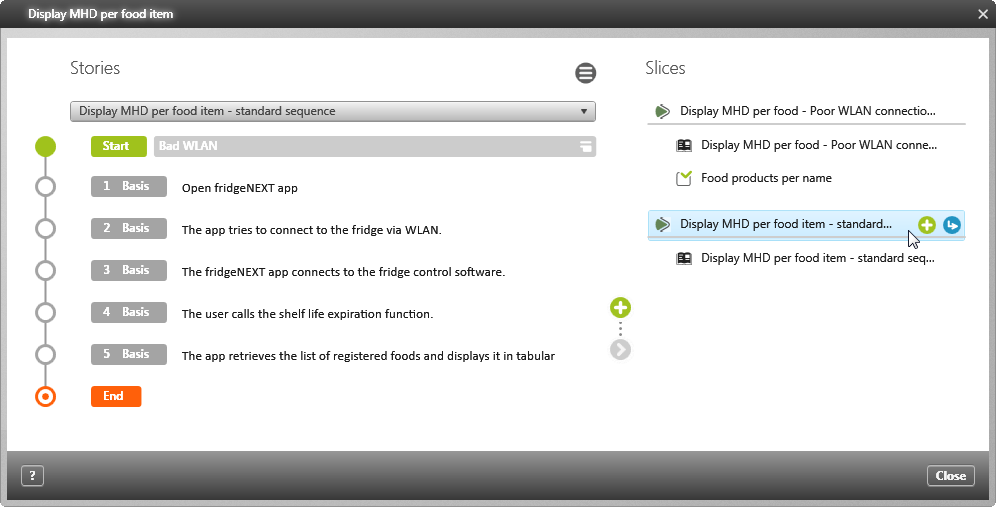
The view is divided into two parts: On the left, you can select the use case stories. On the right, the slices defined for use case stories are listed step-by-step.
 |
Edit the use case. |
 |
Create a new slice. |
 |
Add a story to a slice. |
Note
When you create slices, references to them are stored directly under the selected use case. These references cannot be displayed in requirement diagrams. Instead, take the slices from the package and drag them into a diagram.
When you create slices, references to them are stored directly under the selected use case. These references cannot be displayed in requirement diagrams. Instead, take the slices from the package and drag them into a diagram.
Note
A derivation relationship is created between the use case and the slice when a slice is created.
A derivation relationship is created between the use case and the slice when a slice is created.
 |
Slices are requirements of the type UseCaseSlice. Double-click on a slice to open its editing dialog. |
| |
If you select a slice and then click this button, you create a new test case for the selected slice. |
 |
The selected story |
 |
Test case that covers the requirement. |
 |
If test cases have already been created, assign them using this blue button. |
 |
Use this button to delete test cases and stories. Deleting a story also deletes its test cases and slices. |
Note
If you delete a story on the right side by clicking on the Delete button, its corresponding slices and test cases will also be deleted.
If you delete a story on the right side by clicking on the Delete button, its corresponding slices and test cases will also be deleted.