
Dialog “Edit Interest Relationship”
An interest relationship connects a requirement and a stakeholder and illustrates the specific interest that a stakeholder has in the realization of a requirement.
An interest relationship is represented by a grey dotted line with an arrow. The arrowhead points to the requirement. A stakeholder’s interest in a requirement is weighted and noted as a weight on the relationship line.
The dialog can be opened:
- in a requirements diagram via Edit from the context menu of the relationship
The dialog
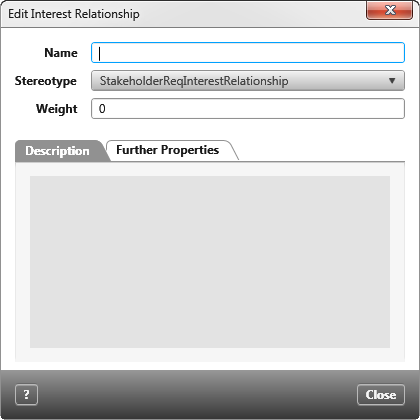
Name You can enter a name here. This is optional and for versions 6.2 and lower it is only used for informational purposes. Starting with version 7.0, however, the displayed relationship name interested is replaced with the name entered here. If you prefer that the original name be displayed, empty the name field and save changes.
Stereotype When creating the relationship, the standard stereotype StakeholderReqInterestRelationship is preselected. If you have extended the stereotype, you can change the preselected stereotype by using the dropdown list. The stereotype controls whether and which user-defined properties are displayed in the tab Further Properties.
Weight Here you enter the level of interest in the requirement. The value is displayed in the diagram at the relationship line.
Tab “Description”
Here you can enter a detailed description.
Tab “Further properties”
If the selected stereotype has user-defined properties, you can define values for these properties here.