
Dialog “Generate precedence diagram”
In general, you can create the view with the Create precedence diagram command on any activity and in all activity views.
Note the following:
- A network always displays only the leaf activities.
- Weekends, statuses and employees are not taken into account when the network is calculated.
- The choice of the control flow (start to start, start to end, and so on) influences the calculation of the network.
- If fixed parent activities exist, a delay is also displayed in the network. In addition, the control flows of the parent activities are inherited downwards.
Note
In the views Project Plan as Gantt Chart, Activity Plan and Project Plan with Staff Utilization, however, a different display may occur in the network if you use a filter here.
In the views Project Plan as Gantt Chart, Activity Plan and Project Plan with Staff Utilization, however, a different display may occur in the network if you use a filter here.
The dialog
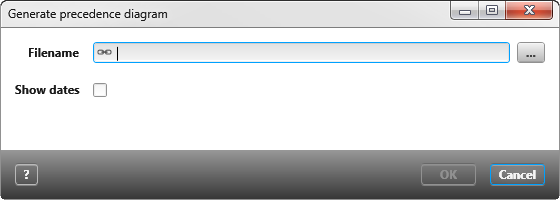
Filename Use the […] button to select a storage path. You can save the network as a PDF file or as a vds file. By default, PDF is selected.
Show dates If the checkbox is checked, the start and end dates of each activity are displayed in the network.
Note
Use Visio 2013 to open the network map. Visio Viewer is not supported.
Use Visio 2013 to open the network map. Visio Viewer is not supported.