
Dialog “Select Event”
In this dialog, you specify which event is to trigger a state transition. Both user-defined events and generic events provided by the system are displayed.
Which generic events are visible depends on the stereotype to which the state machine is assigned.
This dialog opens:
- when you click the blue arrow button in the Edit Transition dialog
The dialog
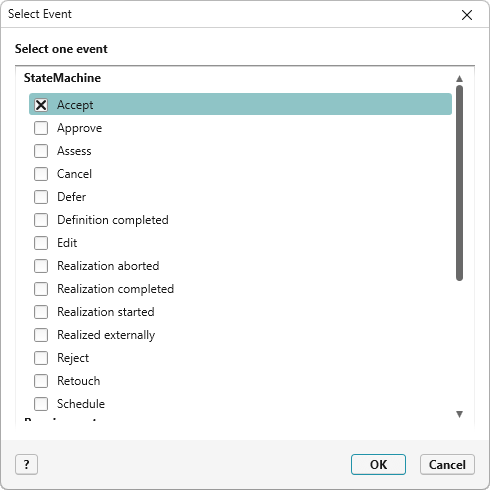
Select the event that is to trigger a state transition and click OK to apply it. The selected event is applied in the Edit Transition dialog and displayed in the state diagram on the relationship line of the state transition.
StateMachine Lists all user-defined events that you have created.
Generic Displays all events that can be used for different element types:
| ImportedFromFile | Is triggered when elements are imported from MS Word, Excel, Project, or a CSV file. |
| OwnerChanged | Is sent when elements or files are moved to other packages or directories, or when activities are reassigned. |
Requirement These events apply exclusively to requirements:
| FilesComittedToVersionControlSystem | Is triggered when a requirement is committed to GitHub via a file. |
| RequirementExportedToAzureDevOps | Is sent when requirements are exported from objectiF RM to Azure DevOps. |
| RequirementExportedToJira | Is sent when requirements are exported to Jira. |
| RequirementImportedFromAzureDevOps | Is triggered when requirements are imported from Azure DevOps. |
| RequirementImportedFromJira | Is triggered when requirements are imported from Jira. |
| RequirementReferencesChanged | Is sent when the references of a requirement have changed (e.g. by moving it to another package). |
ContainsReqRhip These events apply exclusively to the Contains requirement relationship:
| ContainsRelationshipDeleted | Checks whether the relationship to a sub-requirement has been deleted. |
| ContainsRelationshipImported | Checks whether new sub-requirements have been imported via an SXMI file. |
| ContainsRelationshipRequirementDeleted | Checks whether sub-requirements have been deleted. |
| ContainsRelationshipRequirementWorkloadChanged | Informs requirements when the total workload of the sub-requirements has changed. |
Under UseCase, you will find an event that is provided by the tool and is available only for use cases:
| UseCaseReferencesChanged | Is sent when the references of a use case have changed (e.g. by moving it). |
Under Activity, you will find events that are provided only for activities:
| CheckDelay | Checks whether the start or end date of an activity is delayed. |
| ReferenceActivityChanged | Checks for changes to activities that have been referenced from other projects. |
| ActivityPortDeleted | Is sent when inputs or outputs assigned to an activity are removed. |
| RealizeRelationshipDeleted |
Is used to check whether scheduled requirements have been removed. |
| RealizeRelationshipImported |
Is used to check whether imported requirements have been assigned to an activity. |
| RealizeRelationshipRelativeWorkloadChanged |
Is sent when the workload of assigned requirements has changed. |
| SourceActivitySchedulingKindChanged | Is triggered when the calculation type of an activity changes. |
| TargetRequirementDeleted |
Is sent when assigned requirements have been deleted. |
| TargetRequirementWorkloadChanged |
Is sent when the workload of assigned requirements changes. |