
Configuring System Notifications
As of version 7.2, automatically sent notifications are sent as system messages. System messages are notifications that are sent via actions or when users use the My notifications context menu command. An individual notification text can be defined.
It is also possible to send system messages that were sent within a specific period to an email address in a summary email.
Decide on Notification Text
Users with access to the Settings window can specify which text should be sent as a system message when other users need to be notified about state machine actions that affect them. Users that have used the context menu command My notifications to be informed about a change in an element’s state will be notified with a standard text.
- Define the actions for a state in the Edit State dialog. The available actions include Notify editor, Notify project staff, Notify project group and Notify assigned project staff.
- To change the notification text, click on Default text.

In the dialog that opens, with the help of placeholders, you can enter a notification text.
- Go to the System notification tab and enter a text for the notifications sent internally within objectiF RPM.

System notifications are sent via the chat function of objetiF RPM’s messenger.

Send System Message via Email
In the system settings, you can specify for the entire system how users receive system messages.
- In the vertical function bar, open the system settings and select System → Settings → General Settings.
- Switch to the Notification settings tab. Here you define which additional information is sent with a system message and at which interval system messages are sent. By default, sending system messages is set to User specific. This means that there are no predefined settings. If you want to specify settings, use the dropdown menu next to Scope and select Mandatory for all employees if you want to specify that your employees receive summary emails. Even if employees have not configured notifications for themselves, they will still receive summaries when changes occur.
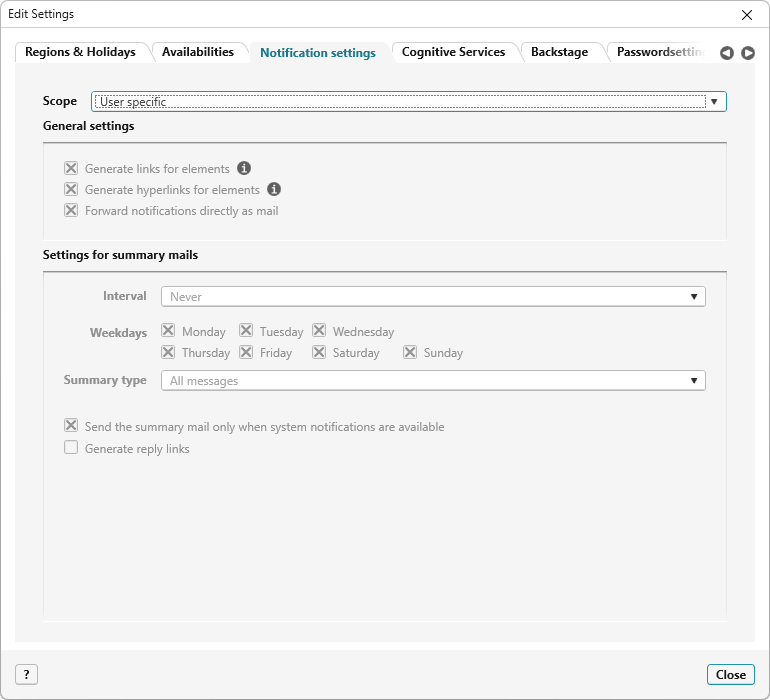
- Save you choices with OK.
Now, when a system notification is sent to a user, an email is also sent to their email address at the same time.